Strokes Gained Benchmarks: Choose the Right Comparison for Your Game
Choose from multiple strokes gained benchmarks in golfity - PGA Tour, scratch, or handicap levels for more relevant analysis.
Tracking your golf scores provides valuable feedback, but raw scores only tell part of the story. Strokes gained reveals which parts of your game need attention and measures exactly how much each area costs you.
How Strokes Gained Analysis Works
Strokes gained breaks your round into distinct components:
- Off the tee: Drives and tee shots on par 4s and par 5s
- Approach: Shots into the green from the fairway or rough
- Around the green: Chips, pitches, and bunker shots within 50 yards
- Putting: All strokes on the green
Each shot receives a value based on how it compares to a benchmark. A shot that advances your position better than the benchmark produces positive strokes gained. A shot that performs worse produces negative strokes gained.
This targeted approach leads to faster improvement because you focus practice time where it actually matters.
The Problem with PGA Tour Benchmarks
Traditional strokes gained calculations compare every golfer to PGA Tour professionals. This creates a harsh reality for most players.
When you measure your 40-foot lag putt against tour players who average 2.05 putts from that distance, you start at a disadvantage. Your three-putt shows a large negative number. Your two-putt barely breaks even.
Consistently seeing negative numbers across every category provides little motivation. The feedback does not feel achievable or relevant to your actual skill level.
Multiple Benchmarks for Every Golfer
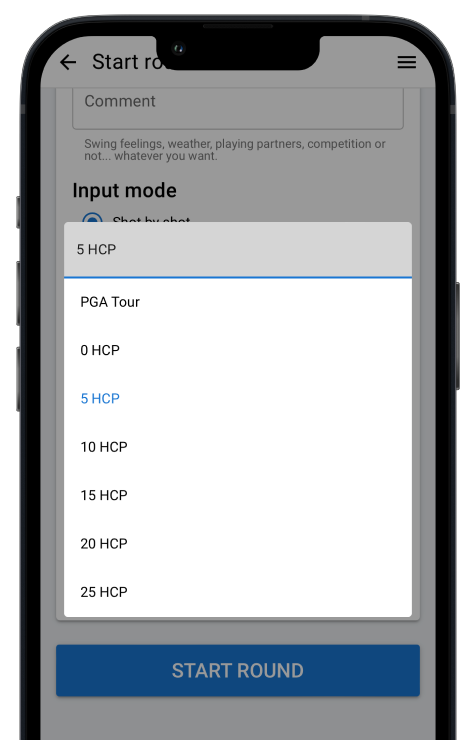
golfity solves this problem with customizable benchmarks. You can compare your performance against:
- PGA Tour players (original benchmark)
- Scratch players (0 handicap)
- 5 handicap players
- 10 handicap players
- 15 handicap players
- 20 handicap players
- 25 handicap players
This range covers everyone from aspiring tour players to high-handicap beginners.
Selecting the Right Strokes Gained Benchmark
When you start entering a new score in golfity, you choose your benchmark. The recommended approach: select a handicap slightly lower than your current playing handicap.
If you play to a 15 handicap, compare against the 10 handicap benchmark. This choice keeps the data challenging while remaining achievable.
Comparing against a slightly better player:
- Shows realistic areas for improvement
- Provides positive feedback when you perform well
- Creates meaningful goals for each round
- Measures progress as you improve
As your handicap drops, adjust your benchmark accordingly. A player who improves from 15 to 10 should shift from the 10 benchmark to the 5 benchmark.
Understanding Your Benchmark Results
With an appropriate benchmark, your strokes gained data becomes immediately useful.
Positive numbers in a category mean you performed better than the comparison group in that area. If your strokes gained putting shows +0.5 against the 10 handicap benchmark, your putting matches that of a single-digit handicapper.
Negative numbers reveal weakness relative to the benchmark. If strokes gained approach shows -2.0, your iron play costs you two strokes per round compared to the comparison group.
The categories that show the largest negative numbers deserve your practice attention. Fix your biggest weaknesses first for maximum scoring improvement.
Practical Example: Benchmark Selection in Action
Consider a 12 handicap player choosing between benchmarks:
Against PGA Tour:
- SG Tee: -1.8
- SG Approach: -3.2
- SG Around Green: -1.1
- SG Putting: -0.9
Every category shows negative numbers. The player loses 7 strokes per round to professionals, which feels discouraging despite being completely expected.
Against 10 Handicap:
- SG Tee: +0.3
- SG Approach: -0.8
- SG Around Green: +0.1
- SG Putting: +0.2
The data now shows strengths (tee shots, short game, putting) and a clear weakness (approach shots). Practice should focus on iron play, and the player can feel confident about other areas.
Track Progress Across Benchmarks
golfity stores your data against all benchmarks. As you improve, you can:
- View historical rounds against your new benchmark
- Track when you start consistently beating a benchmark category
- Identify the moment to graduate to the next level
- Compare your current game to where you started
The journey from 25 handicap benchmark to 10 handicap benchmark represents significant improvement. The data celebrates that progress at every step.
Getting Started with Custom Benchmarks
Download golfity and try the strokes gained calculator to see how your shots compare. When you track a full round, select the benchmark that matches your goals, not your current ability.
Your strokes gained numbers should challenge you while remaining achievable. Find that balance, and the data will guide your improvement for years to come.