Use Strokes Gained to Get to Scratch: A Data-Driven Approach
Discover how Sean Denning uses strokes gained analysis in his journey to become a scratch golfer and why this metric is essential for improvement.
“If you’re serious about getting to scratch, you should be using strokes gained analysis.” That conclusion comes from Sean Denning, an ambitious golfer documenting his journey to become a world-ranked amateur player on his blog Par Machine.
His experience offers a blueprint for any golfer wanting to use data to improve faster.
Why Traditional Stats Fall Short
Most golfers track basic statistics: fairways hit, greens in regulation, total putts. These numbers tell you what happened, but not where you’re losing strokes compared to better players. A golfer hitting 60% of greens might be gaining strokes on approach shots while losing them on the putting green, but basic stats won’t reveal this.
Strokes gained changes everything. By comparing every shot to a benchmark (typically PGA Tour averages), you see exactly where your game stands relative to elite players and, more importantly, where you have the most room to improve.
Sean’s Journey: From Basic Stats to Strokes Gained
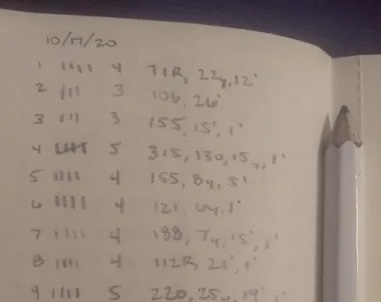
In his post Basic Golf Statistics vs Strokes Gained, Sean describes his initial steps tracking shots manually on the course. He used Golfmetrics, the app created by Mark Broadie, to analyze his data.
After just ten rounds of tracking, Sean realized: “These numbers aren’t perfect as I only have ten rounds of data so far, but the information is drastically better than basic statistics. Now I know what to practice.”
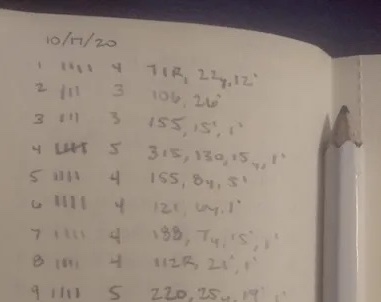
Manual shot tracking during a round requires discipline, but the insights justify the effort. Recording the distance and lie for each shot takes only a few seconds per hole.
Deep Analysis: Tracking Progress Over Time
A few weeks later, Sean published Using Strokes Gained Analysis to Play Scratch Golf, diving deeper into his strokes gained trends. He built custom charts comparing his performance across different time periods.
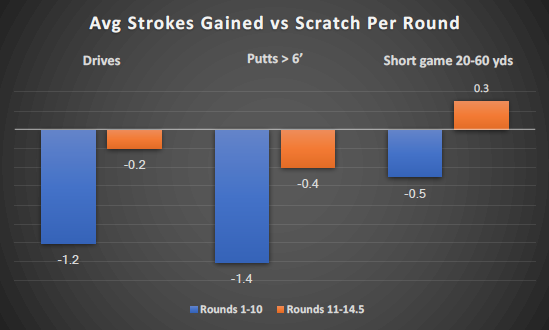
This kind of longitudinal analysis reveals patterns that single-round data cannot. You might notice that your approach play improves during certain months, or that your putting degrades under tournament pressure.
Export Your Data for Custom Analysis
Sean’s approach highlights an important feature: the ability to work with your own data however you want. golfity includes an export feature that lets you download your rounds, holes, and shots as CSV files. Import them into Excel, Google Sheets, or any analysis tool to build your own visualizations and track custom metrics.
Your scores belong to you. You should be able to analyze them any way that helps your game.
The Scratch Golfer’s Conclusion
Sean’s takeaway after months of tracking is clear: “If you’re serious about getting to scratch, you should be using strokes gained analysis. It’s the best way to figure out where you need help and how to prioritize your practice time.”
This applies whether you’re a 15-handicap trying to break 80 or a 5-handicap pushing toward scratch. The methodology scales to any skill level because it measures improvement relative to a consistent benchmark.
Start Tracking Your Strokes Gained
Ready to apply strokes gained to your own game? Here’s how to begin:
- Track shots during your rounds using golfity or a simple notepad
- Record distance and lie for each shot (tee, fairway, rough, sand, green)
- Review your strokes gained breakdown after each round
- Focus practice on your biggest losses rather than random drills
For a detailed explanation of how the calculations work, see example of strokes gained calculation. You can also experiment with different scenarios using our strokes gained calculator.
The path to scratch starts with knowing where you’re losing strokes. Strokes gained analysis provides that map.