Your Round, Explained: golfity's Coach's Note
You already know the score. The coach's note tells you why it happened, names the holes and clubs that mattered, and points at what to work on before the next tee time.

You walk off the 18th knowing the round went sideways, and you still cannot name the reason. The scorecard has an 84 on it. Your bag has a story about the three-putt on seven and the wedge that flew the green on eleven. Neither one is a diagnosis. One is a total. The other is a memory biased toward whatever felt worst.
golfity’s coach’s note closes that gap. Save a shot-by-shot round and the app writes the round back to you in plain English: what carried the score, what leaked the strokes, which holes and clubs did the damage, and what belongs on the range this week.
It is not a tip of the day. It is your round, read aloud.
What the note actually says
Open any finished round and swipe to the coach’s note in the post-round deck, or find it again later inside Round stats. You get a headline, a few short paragraphs, and a handful of bullets. The tone matches a decent coach after walking eighteen with you — blunt when it needs to be, specific about clubs and holes, and short on filler.
A real note looks like this:
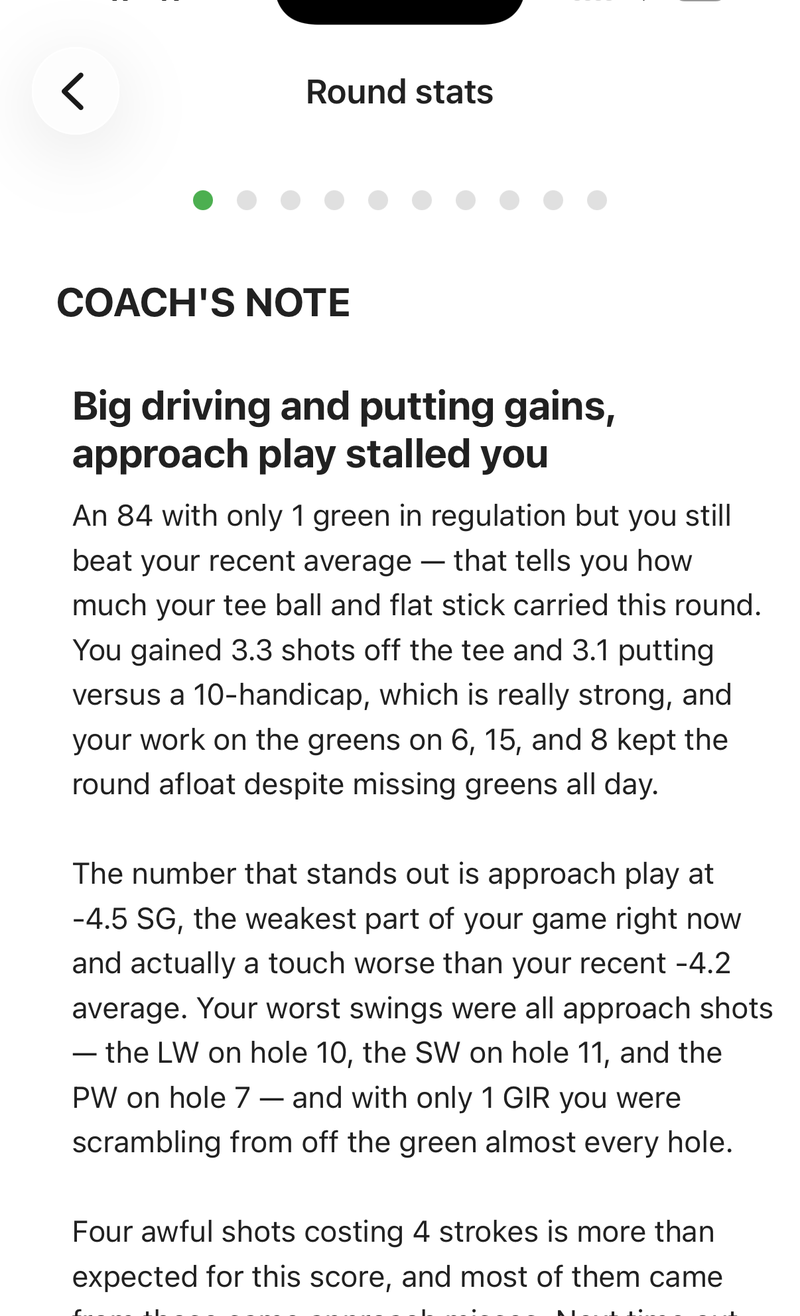 An 84 with one green in regulation. The note still finds the story: tee ball and putting held the round up; approach play and four awful shots dragged it.
Headline first: “Big driving and putting gains, approach play stalled you.” That is the whole round in one line. Then the body fills in the numbers behind it — +3.3 off the tee and +3.1 putting against a 10-handicap, −4.5 on approach — and names the swings that hurt: lob wedge on 10, sand wedge on 11, pitching wedge on 7. It ends where a coach should end: what to practice so the next round lives in the high 70s instead of the mid-80s.
Charts tell you approach was red. The note tells you which approaches, with which clubs, and what to do about it on Tuesday.
Where the analysis comes from
Every sentence is built from the strokes gained on the shots you logged. The note does not invent a theme and hunt for numbers to support it. It reads the four categories — off the tee, approach, around the green, putting — against the benchmark you play to, then drills into the holes, clubs and awful shots that moved the total.
That is why a note written after a shot-by-shot round sounds different from anything a GPS app can produce after a totals-only card. Fairways hit and putts per round describe the day. Strokes gained measures what each part of the game cost you. The coach’s note is that measurement, written so you do not have to interpret a chart on the drive home.
It also pairs with the shorter automatic insights list. Insights are the checkmarks and alerts — the two or three outliers graded against your own baseline. The coach’s note is the narrative that ties those outliers into one story, with the holes and clubs attached. Different jobs. Same round.
You can share the note, not just read it
The same write-up ships as a share card. After you save, swipe to it in the deck and send it to Instagram, WhatsApp, or anywhere else the share sheet goes. Friends see the headline and the bullets, not a crop of your scorecard with the battery percentage still on it.
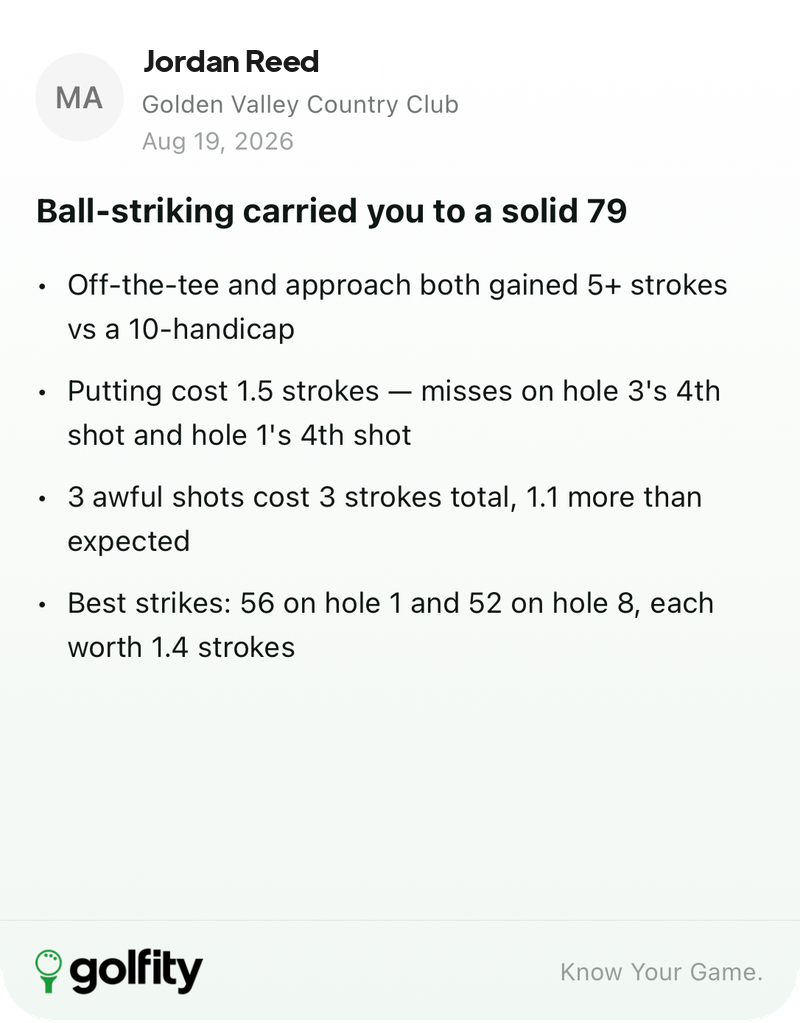 A 79 carried by ball-striking. The card names the putting misses by hole and the two best strikes of the day.
If you already use golfity’s share cards, this is the one that answers “how did it go?” without forcing anyone to decode a strokes gained chart.
How to get one
Three conditions, all deliberate:
- Track the round shot by shot. Totals mode and hole-by-hole mode still give you a score and a summary. They do not give the note enough to say anything honest about clubs or individual swings.
- Play at least nine holes with shots logged. A six-hole fragment is not a round the note will pretend to diagnose.
- golfity Pro. The note is a Pro feature, with the same 7-day trial as the rest of Pro. Free rounds still save and still show their charts; the note is the plain-English layer on top.
When those are true, the note appears in the post-round carousel as soon as the round is saved, and again whenever you reopen the round under Round stats. You do not press a generate button. Opening the round is enough.
The honest limit
The note is only as sharp as the round behind it. Miss a club on three approaches and the note will talk about approach play in general, not about your 52-degree. Log every shot with the right club and lie, and it will name the lob wedge on 10 the way a coach who watched the swing would.
A total score records the day. Hole-by-hole scoring starts to show patterns. Shot-by-shot tracking is what lets the coach’s note stop guessing and start pointing.
Finish a round the way you already finish rounds. Save it. Read the note before you start rewriting history in the car park. Then take the one practice item it named — not the three things that felt bad — and put that on the range.
See the coach’s note alongside the rest of golfity’s tracking features, or start from what strokes gained measures if the categories are still new.