Share Your Golf Round Anywhere: golfity's Shareable Round Cards
Every round you save in golfity turns into a deck of share cards built for posting. Here is what is on each one and where it can go.

You shoot your best round in two years and the only proof is a photo of a paper scorecard on the trunk of your car. Or worse, a screenshot of a stats screen with your battery percentage and three notifications across the top. golfity fixes that. Save a round and the app builds a set of share cards designed for posting, so you can share a golf round in one tap instead of cropping a screenshot.
The cards aren’t a screenshot feature bolted on afterwards. They’re rendered at full resolution, in your app’s theme, with your name, your course, the date and your handicap already on them.
What happens when you finish a round
Save a round in any input mode and golfity takes you straight to the post-round screen. Confetti fires, and you land on a horizontal deck of cards you can swipe through. Each card is a different way of telling the story of that round, and whichever one you’re looking at is the one that gets shared.
Depending on what you tracked, the deck can include:
- The scorecard, hole by hole, with putts if you tracked them
- A summary card carrying your total score, the to-par pill, rings for fairways hit and greens in regulation, and your putt count
- The coach’s note, golfity’s AI read on the round, for Pro members
- My scores, which places this round against your recent scoring trend
- Your strokes gained total for the round plus the four-category breakdown
- Insights, meaning what you did well and what cost you shots
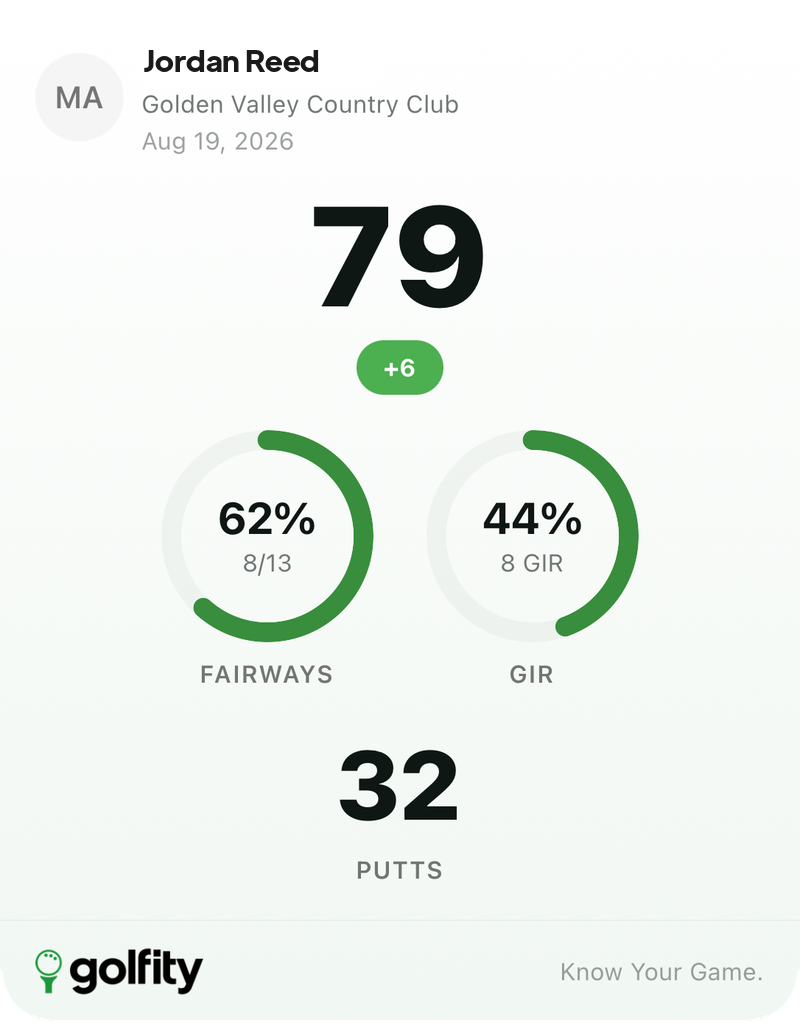 The summary card exactly as golfity exports it — name, course and date at the top, the golfity mark at the bottom, nothing to crop.
Cards you didn’t earn simply don’t appear. Track a round in totals mode and you get the summary without a strokes gained card, because there are no shots behind it to measure. The strokes gained card needs a full shot-by-shot round, and the trend card needs at least three scores in your history.
Where you can share a golf round
Under the deck there are four buttons: Instagram, WhatsApp, X, and the system share sheet.
 The share row sits under the deck. The dots tell you which card is about to go out.
Instagram gets special treatment. Rather than sending a square card that you have to pinch and drag into place, golfity re-renders the card at 1080×1920 and hands it to the Instagram Stories composer as a full-bleed background. It’s already the right shape when it opens.
WhatsApp and X get the standard card image plus a message with your score and course filled in, something like “I shot 82 (+10) at Pedreña!” with the golfity hashtag. You can edit the text before it goes out.
The fourth button is the system sheet, which covers everything else: Messages, Slack, your group’s WhatsApp thread, saving to Photos, AirDrop to the guy you just played with. If Instagram, WhatsApp or X aren’t installed on your phone, those buttons quietly fall back to that sheet instead of failing.
What’s on every card
The frame around each card carries the same information, so a card is readable on its own without a caption:
- Your profile photo and name
- The course you played and the date
- Your handicap, as a pill in the corner, if you’ve set one
- The golfity mark and Know Your Game. along the bottom
The card follows your app theme, so if you use golfity in dark mode you get the dark card. It also follows your language: play in Spanish and the labels come out in Spanish, which matters if your feed is in Spanish and the card isn’t.
Rounds with a picked-up hole show a dash where the total would be. golfity won’t invent a score for a hole you didn’t finish just to make a nicer graphic.
Sharing a round from last month
The share deck isn’t only available in the ten seconds after you save. Open any past round from your history and tap the check-circle button in the header, and you’re back in the same deck for that round, cards and share buttons and all.
Useful in practice for the end-of-season post, or when someone asks what you shot at a course they’re about to play and you’d rather send the card than type it out.
Why post the card instead of the number
“Shot 82 today” tells your friends almost nothing. The summary card shows the 82 alongside 6 of 14 fairways and 7 greens, which is a genuinely different round from the same 82 with 11 greens and 36 putts. One is a scrambling day, the other is a putting problem.
The strokes gained card goes further and shows where the shots actually went. A card reading +1.4 strokes with approach as your best category is a real claim about your golf, not a number without context. If you’re already using golfity to compare your stats with a friend, the share card is the same conversation in a form that fits in a group chat.
Play a round, save it, swipe to the card that best describes the day, and post it. See where round cards fit with the rest of golfity’s tracking features, or read more on what strokes gained measures.