Stats Per Club: Track Your Strokes Gained by Club in golfity
Enter the club you used for each shot and get detailed stats and strokes gained analysis for every club in your bag.
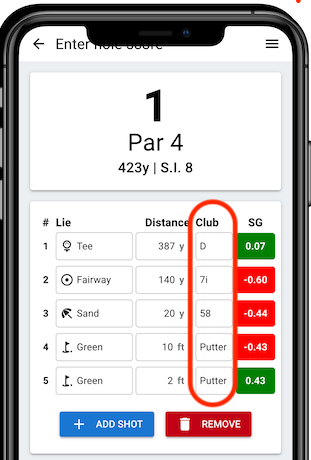
One of our most requested features is here: strokes gained analysis by club. Now you can track which clubs you use on every shot and see exactly how each club in your bag performs over time.
This feature answers questions that raw distance numbers can’t: Is your 3-wood actually helping your score, or would you be better off hitting hybrid? Are you losing strokes with your long irons compared to your wedges? The data tells the story.
Setting Up Your Clubs in golfity
Before tracking club stats, configure your bag to match the clubs you actually carry. When you sign up, golfity provides a default club set, but most golfers will want to customize this.
Navigate to your profile settings and edit your club list. You can:
- Add or remove any number of clubs
- Name clubs however you prefer (4H, 4-hybrid, rescue—whatever makes sense to you)
- Include specialty clubs like driving irons or gap wedges
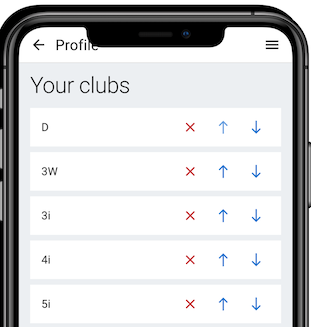
Your custom club list appears whenever you enter shot data, making club selection quick and accurate.
How to Track Club Usage During a Round
To capture club data, start a new round using shot by shot input mode. For each shot, you’ll enter:
- Lie: Tee, fairway, rough, sand, or recovery
- Distance: To the hole
- Club used: From your configured club list
The club selection step adds only a second or two per shot but unlocks powerful insights after your round.
Analyzing Your Strokes Gained by Club
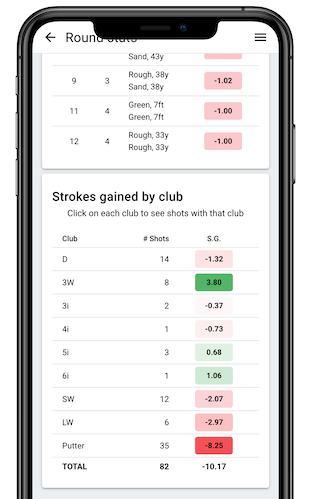
After entering rounds with club data, golfity generates detailed analytics for each club:
Usage frequency: How often do you reach for each club? Some golfers discover they’re overusing certain clubs in situations where others might perform better.
Strokes gained per club: This is the key metric. See which clubs consistently help your score and which ones cost you strokes. A club you hit “well” by feel might actually be losing strokes compared to your other options.
Distance consistency: Track how far you actually hit each club, not how far you think you hit it. Real data often reveals a gap between perception and reality.
Making Data-Driven Equipment Decisions
Club-level strokes gained data helps with several important decisions:
Practice allocation: Focus range time on clubs that lose the most strokes. If your 4-iron shows -0.3 strokes gained per use while your wedges show +0.1, you know where to spend your practice time.
Equipment changes: Data can reveal when a club simply doesn’t fit your game. Maybe that 3-wood you love is actually costing you strokes compared to your 5-wood. Numbers don’t lie.
Strategic choices: On the course, knowing your strokes gained by club helps you pick the right tool. If your hybrid and long iron cover similar distances but the hybrid gains strokes while the iron loses them, the smart play becomes obvious.
The strokes gained calculator combines this club data with shot outcome data to give you a complete picture of where you’re gaining and losing strokes in your game.
Getting Started with Club Tracking
Ready to understand your club performance at a deeper level? Sign up for golfity and start tracking your rounds shot by shot with club selection enabled.
After just a few rounds, you’ll have insights into your equipment that most golfers never access. Let the data guide your practice, your equipment choices, and your course strategy.