Putts Gained on golfity: Measure Your True Putting Skill
See your putts gained for each hole with golfity and understand exactly how well you are putting compared to the PGA Tour benchmark.
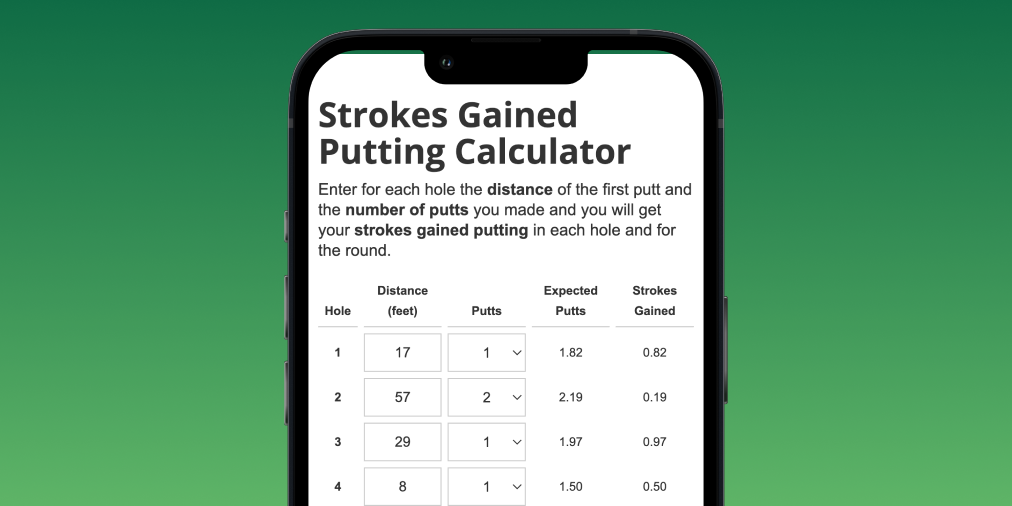
Mark Broadie, the creator of strokes gained, defined putts gained as the best measure of putting skill. Traditional metrics like putts per round, putts per green in regulation, or length of holed putts fail to account for the difficulty of each putt. Putts gained solves this by comparing your performance against a benchmark based on putt distance.
golfity calculates your putts gained automatically for every hole you play, giving you precise insight into your putting performance.
How Putts Gained Works in golfity
The golfity app shows putts gained for each hole in your round. Here’s an example from Jordan Spieth’s third round at the 2022 RBC Heritage tournament:
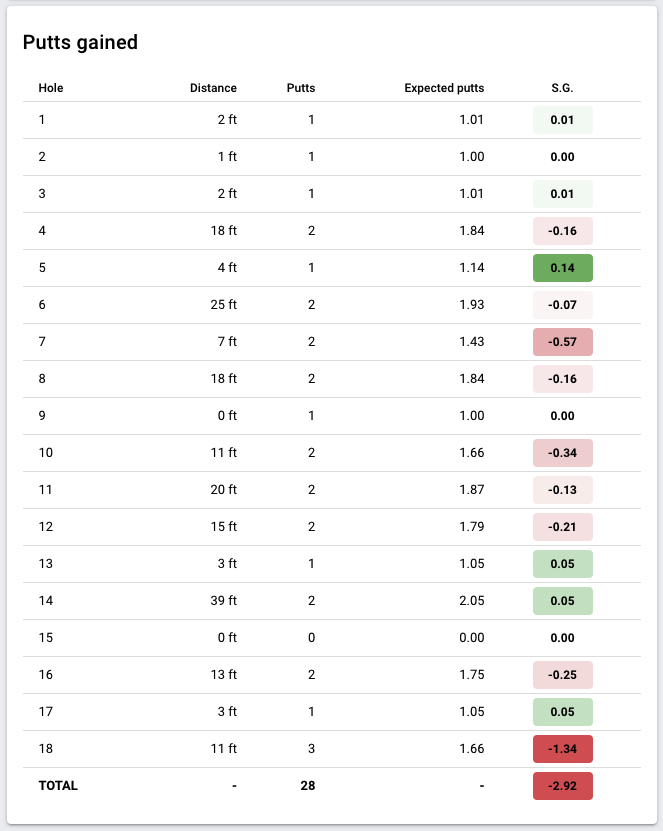
Each hole displays the starting putt distance, the benchmark expectation, and the resulting putts gained or lost.
Real Examples: Breaking Down Spieth’s Putting
Hole 4: A Slight Loss
Spieth’s approach left him 18 feet from the hole. From that distance, the PGA Tour benchmark is 1.84 putts to hole out. Spieth two-putted, resulting in -0.16 putts gained (2 actual putts minus 1.84 expected putts).
Hole 5: A Small Gain
From just 4 feet, the benchmark drops to 1.14 putts. Spieth sank his first putt for a gain of +0.14 (1.14 expected minus 1 actual).
Hole 18: The Costly Three-Putt
Spieth three-putted from 11 feet, costing him -1.34 strokes (3 actual putts minus 1.66 expected). This single green wiped out any gains he made elsewhere.
Why Putts Gained Matters for Your Game
Spieth shot 68 that day, a solid round by most standards. But his putting cost him 2.92 strokes over 18 holes. Without putts gained analysis, he might have assumed his putting was acceptable. The data tells a different story.
This is exactly the kind of insight that helps golfers improve. When you know where you’re losing strokes, you can focus your practice on the right areas. A player losing strokes on putts inside 10 feet needs different practice than one struggling from 20+ feet.
How to Track Your Putts Gained
golfity calculates putts gained automatically when you track your rounds. For each hole, simply enter your starting putt distance, and the app handles the rest.
You can also use our strokes gained putting calculator for quick calculations without signing up. For a deeper understanding of how putts gained works, read about Mark Broadie’s research on putts gained.
Start Measuring Your Putting Performance
Want to calculate your putts gained like a PGA Tour player? Sign up for golfity and start tracking your putting with tour-level analytics. Every round you track builds a picture of your true putting ability, helping you identify patterns and focus your practice where it matters most.
For more on strokes gained methodology, check out what is strokes gained or explore our strokes gained calculator to see how the math works for any shot on the course.