Pick-Up Holes: Track Honest Stats When You Don't Hole Out
Not every hole gets holed out, and that is fine. Here is how pick-up holes keep your golfity stats honest when you pocket the ball.

Most golfers don’t hole out every hole. You make a mess of a par 4, you’re lying six in a bunker, and you pick up to keep the group moving. The hole is over, but your scorecard still needs to say something honest about it. Pick-up holes in golfity solve exactly this: you mark the hole as picked up, and the app keeps your stats clean instead of forcing you to invent a number.
This matters more than it sounds. A single guessed “let’s call it an 8” can distort your scoring average, your handicap, and your strokes gained for weeks. Pick-up holes remove the guesswork.
What a pick-up hole is
A pick-up hole is any hole you didn’t finish. You picked up the ball, conceded the hole, or ran out of patience after a few penalty shots. Instead of recording a final score you didn’t actually make, you tell golfity the truth: this one didn’t get completed.
When you mark a hole as picked up, golfity stores no score and no putts for that hole. On your scorecard it shows as PU instead of a number, so you and anyone viewing the round can see at a glance which holes were played out and which weren’t.
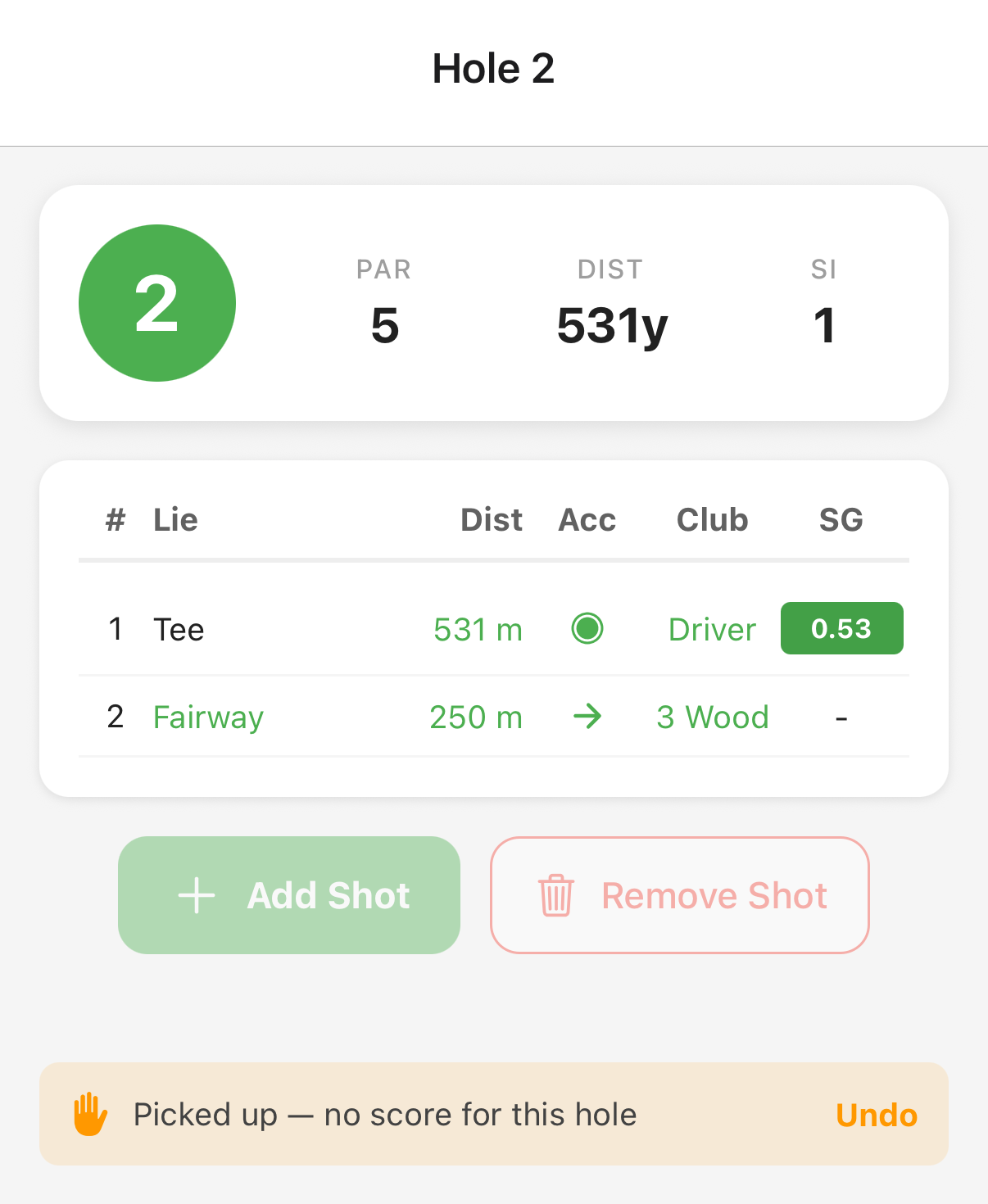 One tap marks a hole as picked up — no score, no putts, and an Undo if you change your mind.
You can pick up a hole in both of golfity’s per-hole tracking modes:
- Holes mode (quick scoring), where you enter a score per hole
- Shots mode (full shot-by-shot tracking)
It’s available right in the hole editor. Open the hole, tap Pick up ball (didn’t finish), and you’ll see a confirmation that there’s no score for that hole. Change your mind? Hit Undo and your score comes back.
How pick-up holes affect strokes gained
This is where golfity does something smarter than a plain scorecard app. In shots mode, you might have entered several real shots before you gave up on the hole, a drive, a layup, a chunked approach. Those shots are real data, and golfity keeps them.
Here’s the rule: every shot you actually hit still counts toward your strokes gained. The only shot golfity leaves out is the final unfinished one on a picked-up hole, because there’s no result to measure it against. Strokes gained works by comparing where a shot started to where it finished. If you never holed out, that last shot has no real ending, so scoring it would be a guess. golfity excludes it and keeps everything before it.
A quick example. Say you tracked four shots on a par 4 before picking up:
- Tee shot into the trees
- Punch-out to the fairway
- Approach that came up short
- A thinned chip you then picked up after
Shots 1 through 3 still earn their strokes gained values, measured against where each shot ended. Shot 4, the one with no holed-out finish, is left out of the calculation. You keep credit for the golf you actually played, and you don’t get a fake number for the part you didn’t.
How pick-up holes affect your stats and handicap
Because a picked-up hole has no real score, golfity treats any round containing a pick-up as incomplete. That has two consequences worth understanding.
First, an incomplete round does not count toward your scoring average or your handicap. The round’s total shows as a dash rather than a total score, and it’s left out of those calculations entirely. This is deliberate. A blow-up hole you didn’t finish shouldn’t inflate your average or distort your index. You get to record the round without polluting your headline numbers.
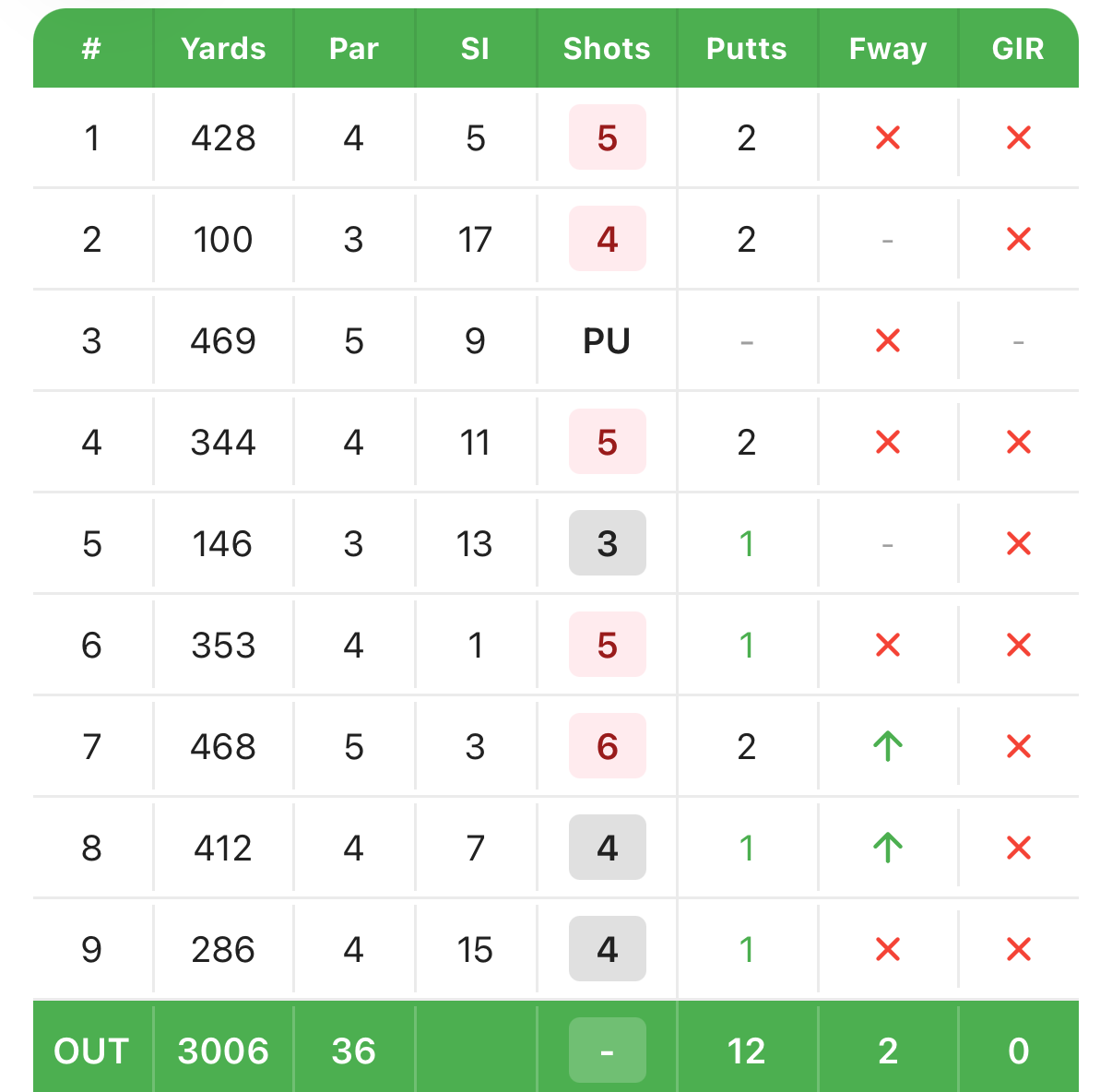 On the scorecard the hole reads PU, and the total for that nine becomes a dash instead of an invented number.
Second, the round does still feed your strokes gained stats. Because the shots you entered carry valid strokes gained data, golfity includes picked-up rounds in your strokes gained breakdown. So the practice signal, where you’re gaining and losing strokes, stays alive even on rounds you didn’t fully complete.
Your traditional stats behave sensibly too:
- Fairways and greens still count on any hole where that data is fully recorded, picked up or not
- Putts simply don’t accumulate from a picked-up hole, since there’s no putt data there
- The hole still counts toward holes played
The tradeoff is straightforward. Pick up a hole and you protect your strokes gained and traditional stats, but that round won’t count toward your handicap. For most golfers tracking improvement, that’s exactly the right balance.
Why this beats writing down a guess
Plenty of golfers handle an unfinished hole by writing down “maybe a 9” and moving on. It feels harmless. It isn’t. That invented number flows straight into your scoring average and, if the round counts, your handicap. Worse, in a shot-tracking app a fabricated final shot can hand you a misleading strokes gained figure, the opposite of what good data is for.
Pick-up holes keep your dataset honest. Combined with golfity’s awful shots tracking, they give you a clear, truthful picture of your game, including the holes that fell apart, without letting one disaster rewrite your stats.
Next time a hole gets away from you, pick up, tap once, and keep playing. Your stats will thank you. See it alongside the rest of golfity’s tracking features.