Strokes Gained Putting Calculator: Measure Your True Putting Skill
Use our free strokes gained putting calculator to measure your putting skill against PGA Tour benchmarks.
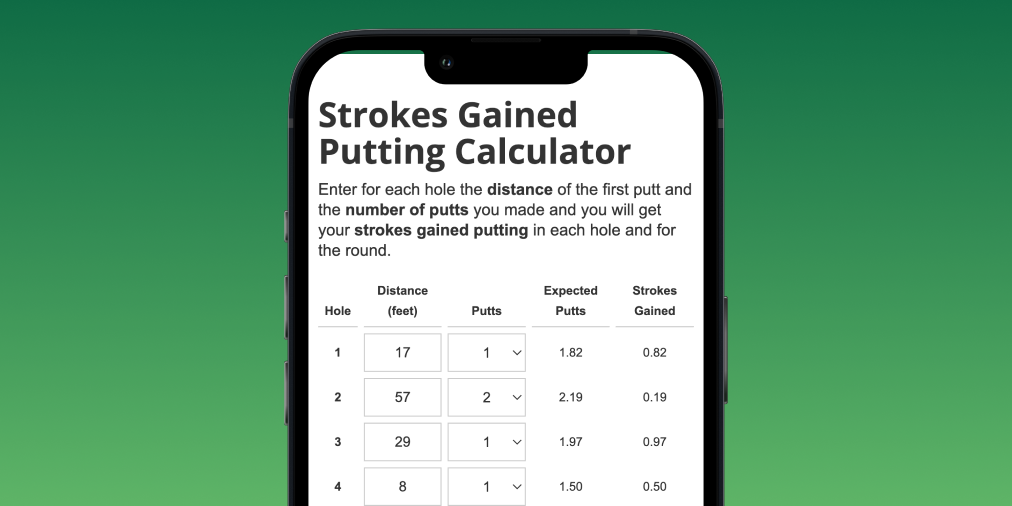
What is Strokes Gained Putting?
Mark Broadie, the creator of strokes gained, defined putts gained as the best measure of putting skill. This metric outperforms other commonly used statistics like putts per round, putts per green in regulation, or even length of holed putts.
Putts Gained (also called Strokes Gained Putting) measures the number of putts better or worse than the benchmark from a given distance. If the benchmark from a given distance is 2.5 putts and you hole in 2 putts, you performed better than the benchmark. If you need 3 putts, you performed worse.
Why Strokes Gained Putting Beats Traditional Putting Stats
Traditional putting statistics have significant flaws:
- Putts per round penalizes good approach play. Hit more greens, take more putts.
- Putts per GIR ignores where you start on the green. A 30-footer counts the same as a 5-footer.
- One-putt percentage fails to account for starting distance.
Strokes gained putting solves these problems by measuring performance relative to distance. A two-putt from 40 feet earns credit for good putting. A two-putt from 5 feet shows room for improvement. The metric captures what actually happened on the green.
How to Calculate Strokes Gained Putting for a Hole
Calculating putts gained for any hole requires only two data points:
- Distance of the first putt (how far you were from the hole before the first putt)
- Number of putts to hole out
The calculator provides a benchmark from your given distance, representing the average number of putts a PGA Tour player needs from that spot.
Subtract your actual putts from the benchmark to get strokes gained putting for that hole.
Example Calculation
Your first putt is 40 feet from the hole. You need 2 putts to finish. From 40 feet, the PGA Tour average is 2.05 putts.
Strokes Gained = 2.05 - 2 = +0.05
You gained 0.05 strokes over the benchmark.
If you had taken 3 putts:
Strokes Gained = 2.05 - 3 = -0.95
You lost 0.95 strokes on that hole.
How to Calculate Strokes Gained Putting for a Round
Add the strokes gained putting values for all 18 holes.
When you hole out from off the green on any hole, the strokes gained putting for that hole equals zero. This makes sense because you did not use the putter, and the hole provides no information about your putting performance.
This approach highlights another flaw in putts per round. Holing a chip counts as zero putts, which inflates the putting statistics even though you never putted.
Understanding PGA Tour Putting Benchmarks
The strokes gained putting calculator uses PGA Tour putting averages as the benchmark. Here are key reference points:
| Distance | PGA Tour Average Putts |
|---|---|
| 3 feet | 1.04 |
| 5 feet | 1.15 |
| 10 feet | 1.50 |
| 20 feet | 1.87 |
| 40 feet | 2.05 |
| 60 feet | 2.22 |
These benchmarks reveal that even tour professionals rarely hole putts beyond 20 feet. The goal from long distance is to two-putt, not to make the putt.
Our Free Strokes Gained Putting Calculator
golfity displays putts gained for your rounds automatically when you track with our app. We also created a standalone calculator anyone can use without entering a full round or signing up for an account.
Try our free strokes gained putting calculator and see how your putting measures up against the benchmark.
Want more detailed analytics? Sign up for golfity and start tracking your golf like a pro. You will get strokes gained data for every part of your game, not just putting.
For calculating strokes gained on any shot, not just putts, try our general strokes gained calculator.